
AI Workflow Automation for UK Businesses
If your team spends hours each week copying data between systems, chasing invoices, or replying to the same customer questions, that time can be given back to you. London Axion builds automated workflows that handle the repeatable parts of your business, so your staff can focus on the work that actually needs a person.
We are based in London and work with businesses across the capital, from small studios in Shoreditch and Farringdon to established firms near Canary Wharf and the City. We also support businesses across the wider UK, whether you are in Manchester, Birmingham, or a village outside Bristol. If your systems are not talking to each other, we can fix that.
Book a free scoping call and we will tell you honestly whether automation is worth it for your business, and what it would cost.
New lead submits form
AI reads & routes it
Right person notified
CRM updated
Follow-up scheduled
Nothing falls through
Software follows a set process — and can read documents, understand plain language, and make small decisions along the way.
What AI workflow automation means?
AI workflow automation takes a task your team does by hand, such as moving a new lead into your CRM or checking an invoice against a purchase order, and lets software do it instead. The software follows a set process, and in many cases it can also read documents, understand plain language, and make small decisions along the way.
People often mix up two related ideas.
Traditional automation
Follows fixed rules with no judgement involved.
AI workflow automation
Adds a layer of judgement inside a process that is still mostly fixed. For example, it can read an email, work out what the customer is asking for, and route it to the right person, rather than just forwarding every email to the same inbox.
The UK adoption picture
According to the Office for National Statistics Business Insights and Conditions Survey, 23% of UK businesses reported using some form of AI technology by late September 2025, up from 9% in September 2023. Research from the British Chambers of Commerce and the University of Essex puts a broader figure at 54% of UK firms using some form of AI, though only around 11% of small and medium businesses use it extensively to automate real operations. That gap between trying AI and actually automating a workflow with it is where most of the opportunity sits.
UK businesses using some form of AI by late September 2025, up from 9% in September 2023
UK firms use some form of AI, per the British Chambers of Commerce and University of Essex
Small and medium businesses use AI extensively to automate real operations
That gap between trying AI and actually automating a workflow with it is where most of the opportunity sits.
How this compares to other approaches
Compared with traditional RPA
Older robotic process automation follows a fixed set of clicks and breaks the moment a screen layout changes. AI workflow automation can read the content of a document or message and adjust to small changes, which makes it more durable over time.
Compared with AI agents
A workflow automates a known, repeatable process from start to finish. An AI agent is given a goal and works out its own steps to reach it, with far less predictability. Most UK businesses are better served starting with a defined workflow, since the outcome is predictable and easier to test before it touches real customers or money.
Custom development compared with no-code platforms
No code tools such as Zapier and Make are faster and cheaper to set up, and suit most businesses starting out. Custom development costs more and takes longer to build, but is worth it once a process handles high volumes, connects to old or unusual systems, or needs logic that a no code platform cannot express.
Choosing the right automation tool
There is no single best tool. The right one depends on how complex your process is, how many systems it touches, and how much control you need over your data.
Z
Zapier
Zapier is quick to set up and works well for simple tasks, such as sending a Slack message when a form is filled in. It connects to thousands of apps and does not need any coding knowledge. It is a good starting point if you are automating one or two simple steps.
M
Make
Make gives you a visual map of your workflow and lets you build in branches and conditions. It suits businesses with slightly more complex processes, such as routing leads based on their answers to a form, where a simple one step trigger is not enough.
n8
n8n
n8n can be hosted on your own servers rather than a third party cloud. This matters for businesses in regulated sectors, such as legal or financial services, where data needs to stay within the UK and under your own control. It is open source, so there is no vendor lock in.
PA
Microsoft Power Automate
If your business already runs on Microsoft 365, Power Automate keeps everything inside the Microsoft environment, including Teams, Outlook, and SharePoint. Data stays within your existing Microsoft tenant, which many UK businesses prefer for compliance reasons.
+
A custom build
Some processes are too specific, too large in volume, or too tied to old systems for an off the shelf tool to handle well. In these cases we build a custom application, usually hosted on Google Cloud Run, designed around your exact process rather than forcing your process to fit a template. A custom build might connect to your systems through an API, react to a webhook the moment something changes, read scanned paperwork using optical character recognition, or sync directly with your CRM.
Most businesses do not need a custom build to start. We usually recommend proving the idea works with a smaller tool first, then moving to a custom build only if volume or complexity genuinely requires it.
A realistic price guide
Prices vary by process, but here is a realistic guide based on the work we see most often from UK businesses.
Around £50 to £200 a month in software costs, plus a one off setup fee depending on how many steps are involved.
MOST COMMON STARTING POINT
This covers one clearly defined workflow, built and tested on a real process in your business, so you can see the result before committing to anything larger.
Depending on how many systems need to connect and how much data the process handles.
What actually changes the price is the number of systems involved, how much the data needs cleaning up, and whether the process needs a person to approve each step or can run fully on its own.
Five workflows most UK businesses should automate first
Trigger: Form submitted
New lead notification and routing
When someone fills in a form on your website, the right person on your team is told straight away, rather than finding out hours later when they check their inbox.
Trigger: Invoice received
Invoice processing
Invoices are read automatically, checked against a purchase order, and pushed into accounting software such as Xero, cutting down the time spent on manual data entry.
Trigger: Contract signed
Employee onboarding
New starter paperwork, account setup, and welcome emails are triggered automatically the moment someone signs their contract, so nothing gets missed in the first week.
Trigger: Schedule
Weekly reporting
Numbers are pulled from different systems and put into one report automatically, instead of someone spending an afternoon copying figures into a spreadsheet.
Trigger: Enquiry goes quiet
Customer follow up sequences
Customers who go quiet after an enquiry get a well timed follow up message automatically, so fewer leads are lost simply because nobody had time to chase them.
Professional services
Law firms, accountants, and consultancies around London use automation to handle client intake, document generation, and billing, freeing up billable hours for actual client work.
Logistics & Transport
Logistics and transport
Businesses moving goods across London and the wider UK use automation to track shipments, update customers automatically, and flag delays before a customer has to ask.
Retail and ecommerce
Online sellers use automation to sync stock levels across platforms, send order updates, and handle simple customer service questions without a person needing to reply to every message.
Sector use cases
If your sector is not listed here, tell us about your process on the scoping call and we will tell you honestly whether it is a good fit for automation.
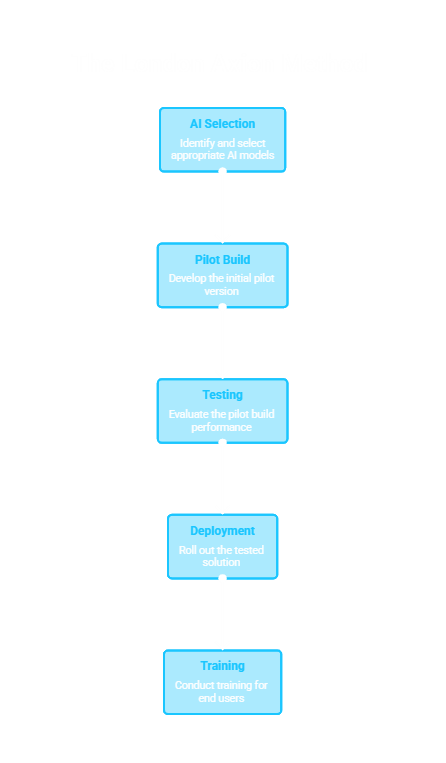
Every project follows the same nine steps
Discovery
Where we learn how the process actually works today, not how it is supposed to work on paper.
Process mapping
Where every step is written down and agreed with you.
Workflow design
Where we plan the automated version.
AI selection
Where we choose the right tool or model for the task, never the other way round.
Pilot build
Where one real workflow is built and tested.
Testing
Where we try to break it before your customers do.
Deployment
Where it goes live in your business.
Training
Where your team learns how to use and adjust it.
Optimisation
Where we tune it based on real results.
Every project starts with a scoping call, not a sales pitch
At London Axion, every project starts with a scoping call, not a sales pitch, and every build includes a plain English handover so your team understands what was built and why.
Trust built into every workflow
✓
Human checkpoints
We build a human checkpoint into any workflow that makes a decision with real consequences, such as approving a refund or sending a contract. The software prepares the work, but a person still signs it off where it matters.
UK
UK-based data
All data is processed and stored within the UK, and we are happy to put this in writing as part of any contract.
≡
Audit logs
Every workflow we build includes a log of what happened and when, which matters if you are ever asked to show how a decision was made, particularly in regulated industries.
How to measure return on investment
Before we build anything, we agree with you what success looks like. This usually includes hours saved each week, a reduction in errors, and how much faster a process runs from start to finish. We set this up so you can see the numbers for yourself, not just take our word for it.
When automation is not the right answer
We will not sell you something that will not pay for itself. If a process changes every few weeks, if it only happens a handful of times a month, or if it genuinely needs a person’s judgement at every step, automating it is often not worth the cost.
Part of our scoping call is telling you honestly if that is the case for your business, even if it means we do not win the work.
Every London Axion project can also draw on our other services, including:
Automation audits for businesses who want a second opinion on an existing system
Ask us about any of these on your scoping call.
Frequently Asked Questions
What is AI workflow automation?+
It is the use of software, often including AI, to carry out a business task that a person would otherwise do by hand, such as updating records or replying to routine enquiries.
What’s the difference between AI automation and an AI workflow?+
Automation is the general idea of software doing a task automatically. A workflow is the specific series of steps that get automated, from the trigger to the final action.
How much does AI workflow automation cost for a UK business?+
Simple automation starts from around £500 a month in software costs. A built pilot project with an agency typically costs between £2,000 and £10,000.
Which business processes benefit most from automation?+
Repetitive tasks that follow a clear pattern benefit the most, such as invoice processing, lead routing, and reporting. Tasks that change often or need real judgement are usually a poor fit.
How do you calculate return on investment for automation?+
Compare the hours a task used to take against the hours it takes now, add in any reduction in errors, and weigh that against the monthly or one off cost of the tool.
Should I use a no code platform or hire a developer?+
Simple tasks with one or two steps are usually fine on a no code platform such as Zapier. Complex processes involving several systems or large volumes of data often need custom development to run reliably.
What is Microsoft Power Automate and how does it compare to Zapier?+
Power Automate is Microsoft’s own automation tool, built to work closely with Microsoft 365 apps. Zapier connects to a wider range of apps outside the Microsoft ecosystem, but does not have the same depth of integration with Teams, Outlook, and SharePoint.
Is AI workflow automation GDPR compliant?+
It can be, provided the tools used store and process data within the UK or an approved location, and the business has clear records of what data is collected and why. We confirm this in writing before any project starts.
How do digital workers differ from a typical RPA bot?+
A traditional RPA bot follows fixed rules and breaks if anything changes on screen. A digital worker built with AI can read documents in plain language and adapt to small variations, which makes it more resilient to change.
Will automation replace my staff?+
Office for National Statistics data from late September 2025 shows that only 4% of UK businesses using AI reported a fall in overall headcount as a result. Most businesses use automation to remove repetitive work from existing staff, not to replace them.
Book a free thirty minute scoping call
Tell us about one process that is costing you time. We will map it out together and give you an honest view of whether automation makes sense, what it would cost, and how long it would take.
London Axion is based in London and works with businesses across Greater London and the rest of the UK. All data is handled within the UK and every project starts with a pilot, so you see results before you commit to anything larger.